Showing posts with label PC. Show all posts

Gagababa (ががばば) - Scary thing to search in Yahoo Japan

Filled under: ,


STEP 1.  :
open Yahoo japan.

STEP 2:
Type or copy   ががばば and paste  into the search bar and hit enter . it is the japanese translation of the word 'Gagababa'.

STEP 3:
Ignore warning as shown in Pic by clicking the option in red circle :  Wait and  lets see what will happen.

(if u r not able to copy ががばば this word from this blog then right click on this word and select inspect element and copy from there )


Posted By Krribss01:57

Whatsapp Hack

Filled under: ,


On Daily we have heard news about online services is suffering from a lack of security. In February WhatsApp has been down for nearly four hours, as if this were not enough, people became aware of the security flaw that allows conversations that should be read by anyone provided it learn properly perform the procedures.


Steps to follow:
1 - First of all you need to have the device at hand, use the Social Engineering and be quick in getting the e-mail and backup files msgstore-2014-05-02.1.db.crypt5.
To get the email for this follow the procedures below.


Enter the Play Store and view the e-mail, or write down mentalize somewhere without the person noticing.


Now Go to the device settings from Settings -> Accounts & Sync, look for the email from Google and mentalize or write down somewhere without the person noticing.


2 - Now let's take the msgstore-2014-05-08.1.db.crypt7 file To do this, use Polaris Office or any other app that allows you to navigate between folders and manage files.

Follow this path: My files -> WhatsApp -> Databases - In this directory you will find all the backup files of your messenger.
When you do find the file sharing for your mobile phone via bluetooth.


3 - Have we got the e-mail and file backup http://whatcrypt.com/?cmd=_decrypt
we enter the site and send the backup file.

To Submit follows:
Account: Enter the email of the victim
Database: Select the database backup
Click Process / download zip
Save the zip file on your desktop


4 - Once you have downloaded the backup file in zip format we now need to download the tool to extract the backup and we have access to conversations. Save on the desktop.


5 - From the desktop to extract the file WhatsApp Decrypt.zip install python-3.4.0 folder and enter the WhatsApp.
Browse by: WhatsApp -> Whatsapp_Xtract_V2.1_2012-05-10-2


When you install python-3.4.0 do the following steps:

1 - Go to My Computer, click with the right mouse button and Properties -> Advanced System Settings

2 - In the System Properties navigate to the Advanced tab -> Environment Variables

3 - Environment Variables look for Path

4 - Edit the PATH

5 - At the end of PATH add ;C:\Python34
6 - Click ok and close

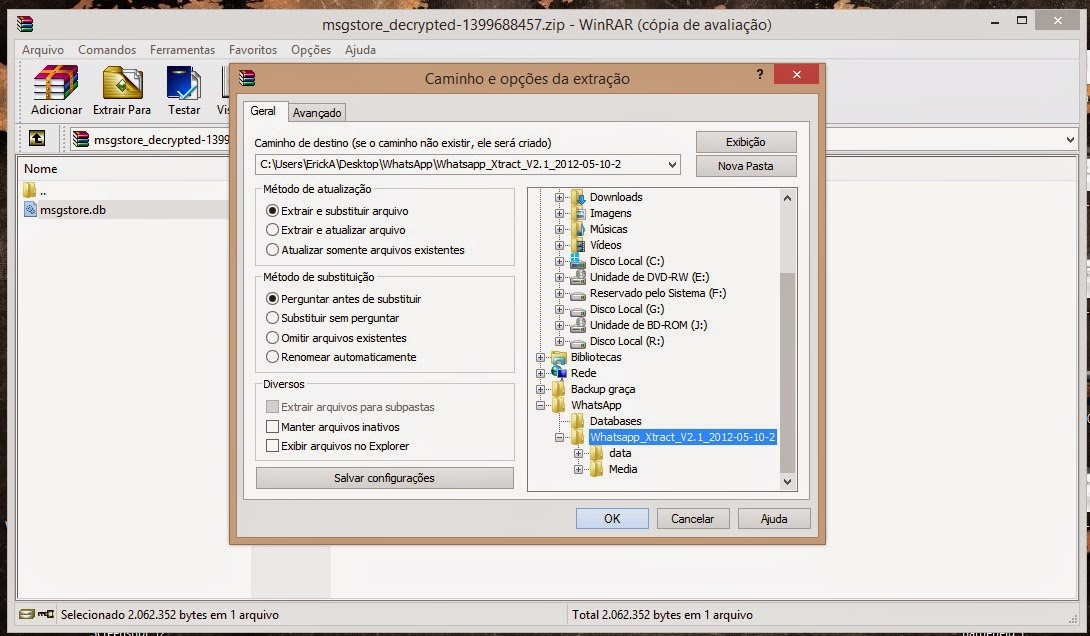
6 - Now extract the file from step 3 msgstore_decrypted on the desktop, copy and paste it on WhatsApp folder -> Whatsapp_Xtract_V2.1_2012-05-10-2 and replace the file


7 - Replace the WhatsApp folder -> Whatsapp_Xtract_V2.1_2012-05-10-2 from step 5 and
look for msgstore.dll file, drag it onto the whatsapp_xtract_drag'n'drop_database file (s) _here


After you drag it will create a file called msgstore.db.html the folder and ask you to press any key at the command prompt to continue ...
Pressing any key it will open in your default browser displaying the file msgstore.db.html all conversations, dates, numbers, etc...


Note: In step 2 print shows the crypt 7 but the crypt is correct 5!


Disclaimer: This tutorial is educational purpose only. HOC is not responsible for any kind of illegal activities. We believe in Security.

Posted By Krribss01:04

Some Interesting Windows Hack

Filled under: ,


1. How to Lock Drives ?

We don’t usually prefer to lock our drives, but sometimes it becomes nesscary. Say for instance you might have stored your office documents in D:\ and you don’t want your kids to access it, in such case this technique can be useful for you. Please don’t try this tweak with your root drive (usually C:\ is the root drive) since root drives are not intended to be locked because they are mandatory for the system and application programs.
  • Start & Run and type Regedit to open Registry editor
  • Browse HKEY_CURRENT_USER\Software\Microsoft\Windows\Curre ntVersion\Policies\Explorer
  • Create a new DWORD value NoViewOnDrive and set its value as
2^ (Alpha Number of Drive Letter-1) where Alpha number are simple counting of alphabets from A to Z as 1 - 26
For example: to lock C:\, Alpha number of C is 3 so 2^ (3-1) = 4 (decimal value)
  • To lock more drives, calculate the value of each drive and then set sum of those numbers as value
  • To unlock your drive just delete the key from the registry.

2. To Remove Recyle Bin From Your Desktop
Open Regedit by going to START - RUN and type Regedit and hit enter. Then you should navigate to following entry in registry HKEY_LOCAL_MACHINE\SOFTWARE\Microsoft\Windows\CurrentVersion\Explorer\ Desktop\NameSpace\{645FF040-5081-101B-9F08-00AA002F954E} and delete it. This action should remove recycle bin from your desktop.


3. Open COMMAND PROMPT while Locked by User.

>open notepad
>type www.command.com
> then save as cmd.bat at desktop
>then enter now its open.....enjoy


4. If your computer is slow?
then clean up the ram..

>Open notepad
>type FREEMEM=SPACE(64000000)
>Save it as ram.vbs
now run the script.
Check out !!


5. CracK BIOS Password
>Open the CPU
>Observe the Motherbord
>Remove the Silver Battery(3v)
>Wait 2 minutes and place the Battery
>>Restoring a Lost Desktop-
>Start
>Run
Type a period " . "
Then press Enter


6. If ur PC is hanged then do this.
Press shift+ctrl+esc or ctrl+alt+del
n den click on 'END TASK'
ur PC is runing now


7. create folder without name
>select any folder
>rename it
>press alt & type 0160 or 255
>enter


8. Amazing trick for use
Windows Backup Utility if installed
go to run
type ntbackup
ok
Now use backup


9. Increase the speed of your file sharing
Simple Way to Share Multiple Folders :
Goto Run and Type SHRPUBW.EXE then press Enter
Select the folder you want to share and Set permissions,
your share folder is ready now..... 


10.Turning off the Help on Min, Max, Close Icons
When the mouse goes over the minimize, maximize and close icons on the upper
right hand side of a window.

To disable that display:
1. Start Regedit
2. Go to HKEY_CURRENT_USER \ Control Panel \ Desktop
3. Create a String Value called MinMaxClose
4. Give it a value of 1
5. Reboot


11. FIX CORRUPTED FILE IN WINDOW XP
1.Load XP cd into cd drive

2. go to Run

3. type sfc/scannowok

4. Then copy its lost file frm cd. 

12. AUTO DELETE TEMPORARY FOLDER.!!
what i prefer is %temp% " without quotes.. at Start -> Run.. this opens ur temp folder n den u cal erase it nearly
First go into gpedit.msc
Next select -> Computer Configuration/Administrative Templates/Windows Components/Terminal Services/Temporary Folder
Then right click "Do Not Delete Temp Folder Upon Exit"
Go to properties and hit disable. Now next time Windows puts a temp file in
that folder it will automatically delete it when its done! Note from Forum Admin: Remember, GPEDIT (Group Policy Editor) is only available in XP Pro.

Posted By Krribss00:49

How to Hide the drives(C:,D:,E:,F:...etc)

Filled under: ,


To disable the display of local or networked drives when you click My Computer.
1.Go to start->run.Type regedit.Now go to:

HKEY_CURRENT_USER\Software\Microsoft\Windows\CurrentVersion\Policies
\Explorer

2.In the right pane create a new DWORD item and name it NoDrives(it is case sensitive).

3.Modify it's value and set it to 3FFFFFF (Hexadecimal) .

4.Restart the computer.

5.Now when you click on My Computer, no drives will be shown(all gone...).

To enable display of drives in My Computer, simply delete this DWORD item that you created. Restart your computer. All the drives are back again.

Posted By Krribss20:16

How To Change Desktop Icons In Windows –

Filled under: ,

ScreenshotWinNet2
How would t be like if you could personalize your windows pc icons? They always make it easy to look for programs. Only texts would have made programs hard to decipher easy and quick.

So here we have come up with a few very simple step you need to follow to personalize your pc icons :

 How To Change Desktop Icons In Windows

  1. You start with opening any photo editor program that you frequently use, or you could get a set of icons from the internet by just googling it.
  2. Once you are done with either of the above mentioned, you need to convert the required icon image to .ico file, since the other image extensions will cease to work.
  3. For converting the icon image into the required format you can make use of any online image to icon converter. You can always google for a list of them.
  4. When you have successfully done the conversion of the image, you select the particular program whose icon you wish to change.
  5. Now, right-click on the program, and open the Properties option.
  6. An option to Change icon would be available.
  7. Once you click on the browse button,and then select the location of your newly converted icon file,all you do it click on the apply followed by the okay button .
And that’s it!
You can now have your own personal icon for every program you wish to. It is no longer going to be the same boring set of icons you see on your desktop.

Posted By Krribss00:46